7 replies

Spanner
Axelera Team
Forum|alt.badge.img+3
  • Axelera Team
  • February 27, 2026

Outstanding! Awesome to see it working, with some pretty tricky covers too - lot of noise from the cover picture and the elaborate fonts, but you’ve nailed it!

The gesture control is awesome too. I’ve been slowly realising the value of these kind of gestures from projects across all the Smarter Spaces entries. When you think about it, we’ve been really focused for the past year or two on making AI (computers, really) learn to communicate with us the way we communicate with each other.

But why does that have to be the only way? Why not develop new and efficient ways to communicate with a computer, too? Context aware gestures, for example!


Denovo
Ensign
  • Author
  • Ensign
  • February 28, 2026

We have added some commands through QR codes. In this way, it is possible to re-trigger the calibration, enable or disable the diagnostics, and force or cancel a regular shutdown of the Orange Pi. 


  • Cadet
  • February 28, 2026

Hi, everyone! We uploaded the OP-support file, i.e. the stl file that lets you print a simple support for your Orange Pi. Feel free to download and use it as you like…. 


Denovo
Ensign
  • Author
  • Ensign
  • March 1, 2026

​After clearing our kanban, let's summarize all the project details.

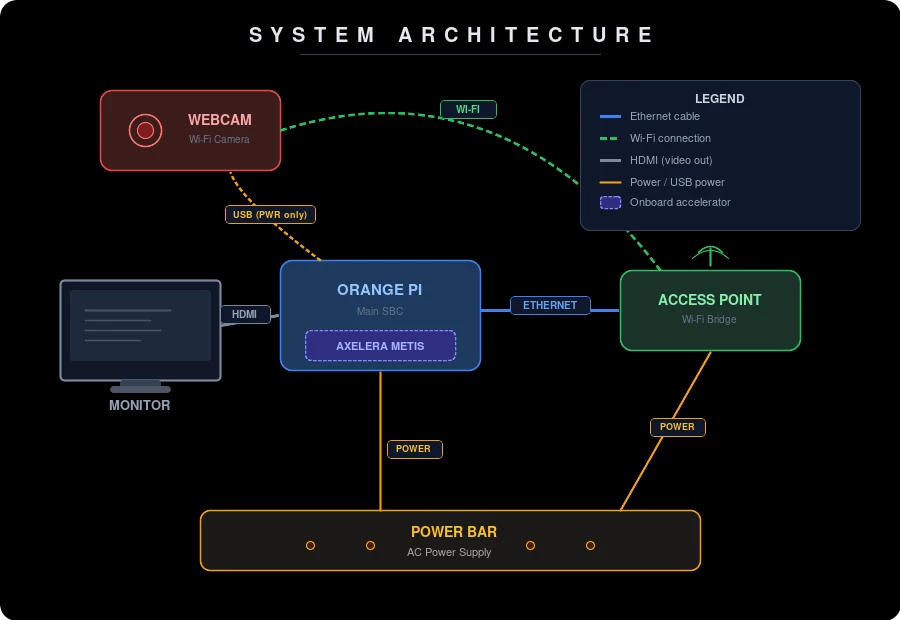
In the final setup we had everything offline (except for the Wi-Fi connection between the S2 CAM and the access point), which allowed us to remove the USB Wi-Fi adapter we were using on the Orange Pi (that, due to an obsolete driver, was causing some random crashes) linking directly with an ethernet cable to the access point.

A.B.C - Final setup

Of course in the new setup we had to re-verify and re-connect everything:

  • the height of the lamp we use as a bracket for the camera (keeping its light off, since we found it's better to have no direct light on the cover)
  • its positioning above the loading area and its horizontal alignment, checked with a dual-bubble level
  • the 4 X markers that we initially made too small in the final setup and that were not being detected by the calibration procedure
  • S2 CAM powered by a free USB port on the Orange Pi, since we have found it works (saving a power adapter) and since the eWeLink does not work with no internet connection, we did a quick network scan just to find its new address updating the local .env file

Denovo
Ensign
  • Author
  • Ensign
  • March 1, 2026

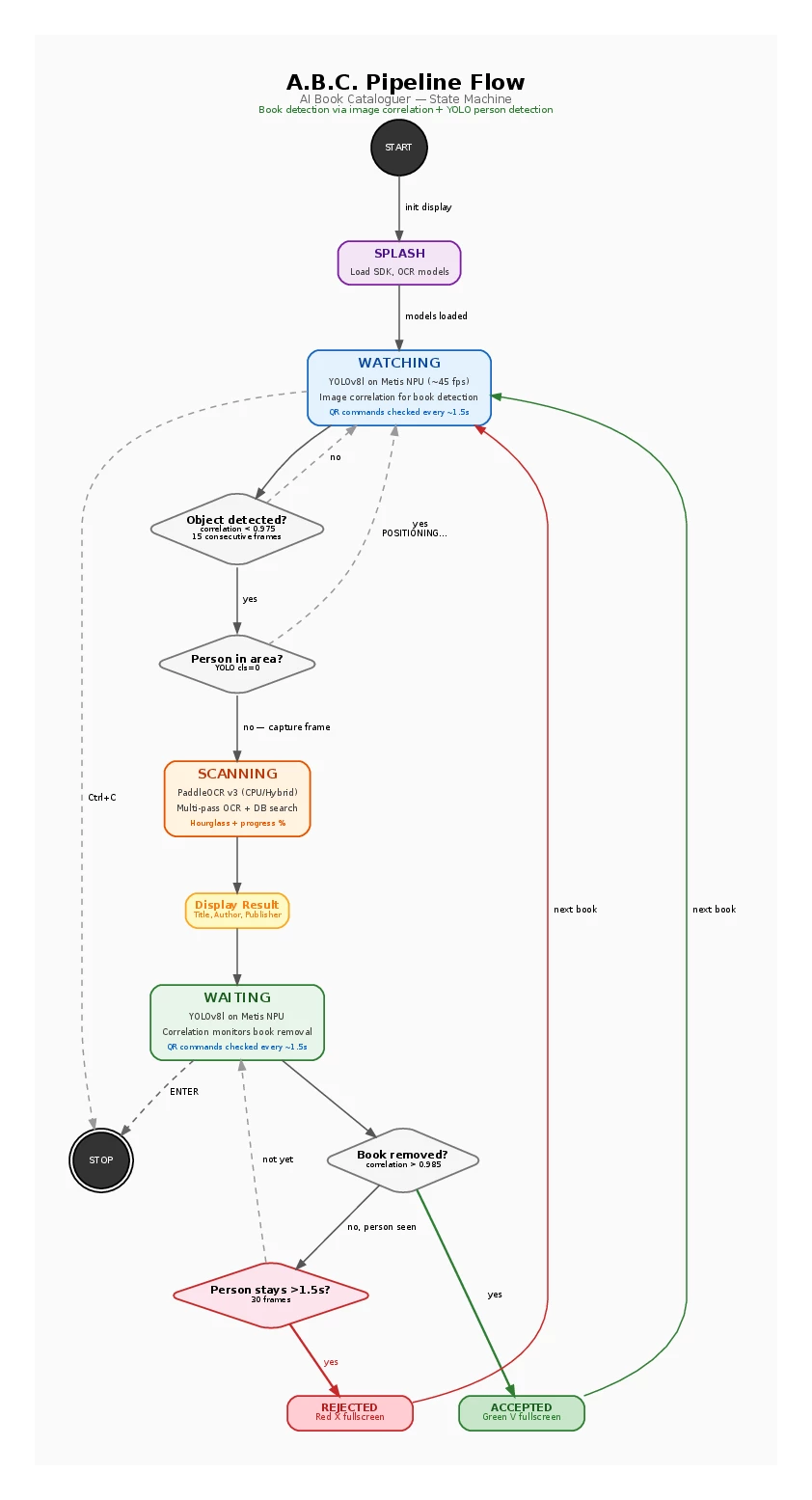
From a software perspective:

A.B.C - Pipeline flow
  • we created a pipeline that continuously waits for a book to be detected in the loading area (YOLOv8l on Metis NPU); as long as the operator's hands are not excluded (because they are still positioning the book), the OCR process does not start
  • once it is detected that a book - and only the book - is present in the loading area, a sub-pipeline is triggered that performs multiple passes to identify as many text blocks as possible and combine them together, attempting to reconstruct whether they belong to the same piece of information (e.g., a title split across multiple lines), and then actually acquires them; we have implemented three strategies (cpu-only, metis-only, cpu+metis hybrid) and the default one is the hybrid approach that use the Metis to quickly identify the text blocks (with a stable but older model), while the CPU is used to do the OCR acquisition (with a newer model)
  • at this stage, several acquisition errors can occur, also related to the models used and the lighting conditions; therefore, we added a local database that allows:
    • vertical lockups (by author, by title, by publisher)
    • fuzzy search to try to correct words that were acquired incorrectly and "probably" should be something else  (we initially tried using an LLM or even an SLM, but it was not a viable path, both due to the resources required and because, being "creative," it did not reliably correct the acquisitions but rather made them up!!!)
    • try to catch the full tuple (title, author, publisher) or the partial one (title, author) to increase the success rate; but of course this is more of a db-related issue
  • the S2 CAM acquisition is cropped to the loading area only and displayed in the foreground to the operator, to exclude any external interference (e.g., my hands on the keyboard or a smartphone being interpreted as a book…).
  • after reading the data acquired, the operator simply slides the book away to confirm the acquisition, which is then saved to a local CSV file; if instead they show crossed fingers under the camera, it triggers a discard action
  • for both confirmation and discard, we added a time bar, in case there is a change of mind and the operator wants to interrupt that action
  • at this point, the UI shows a big green ✓ to confirm the acquisition or a big red ✗ to confirm the rejection, and then starts again waiting for a new book

A final note on the OCR sub-pipeline: we tried adding other stages such as black/white, inverted black/white, red-only, blue-only, green-only and their inverted counterparts, which you can enable by adding the parameter --color-filters; however, we did not notice significant improvements, so we decided to keep them off in the default behavior.

All the code, documentation, instructions, QR codes, images… are available in our github repo. Feel free to open an issue for any inaccuracies, errors, or suggestions!

@Spanner : The 3,000-character post limit was another challenge too 😅


Mariusz
Axelera Team
  • Axelera Team
  • March 3, 2026

Thank you for sharing. Very interesting project. I think Oxford Library University maybe interested to use it. They do records for so many years all published printed paper documents. I believe this project can have real in use. Congratulations.  


Denovo
Ensign
  • Author
  • Ensign
  • March 3, 2026

Thank you so much, Mariusz! It would truly be an honor to present this project to such prestigious users.