


The latest version of Voyager® Software Development Kit (SDK) is here and this release touches nearly every layer of the stack. Whether you're deploying on new hardware, building custom inference pipelines, or are just tired of wrestling with installation scripts, there's something in this release for you.
Release Highlights for version 1.6
Top 3 highlights:
- Support for the new Axelera Metis® M.2 Max
- Install Voyager SDK with a single line of code
- Build complete inference pipelines in pure Python
Also new in this release:
- New models added to the model zoo
- Track multiple objects with TrackTrack, including subjects that exit and re-enter the scene
- Optimize multi-camera pipelines for high-throughput, high-resolution inference
- Deploy Metis across more devices, OSes, and virtual environments
- Streamline your development workflow with improved tools
Metis M.2 Max: unprecedented performance in an M.2 form factor
The Metis M.2 Max provides an option from the Metis M.2 module, giving you double the memory bandwidth, a lower profile and advanced thermal management features for more demanding, but still compact, edge inference. This version of Voyager features support for the new Metis M.2 Max. The software takes full advantage of the module’s new capabilities to deliver the inference performance of a PCIe card, but in the compact M.2 form factor. This opens up deployment in space- and power-constrained edge devices such as retail kiosks, industrial gateways, and embedded vision systems without compromising performance.
The increased memory bandwidth makes Metis M.2 Max particularly suited for running Large Language Models (LLMs) on edge devices. Additionally, the firmware implements closed-loop power control, letting you trade peak compute for a predictable power envelope. Set your limit with axdevice --set-power-limit and the hardware will make sure to stay within your thermal and electrical budget. When AI cores go idle, frequency drops automatically, saving roughly 0.6 Watts across all four cores with zero impact on active workloads.
Install with pip, Run Anywhere
This is a big one for developer experience. The SDK is now delivered as standalone Python wheels which are installable via pip on Python 3.10 through 3.13. There are two wheels: axelera-rt for the runtime environment and axelera-devkit for the compilation/development environment.
With ManyLinux compliance, these wheels work across multiple Linux distributions including Debian 12 & 13, RHEL 9 & 10, and Yocto-based distributions without needing the Axelera installer script. If you've been waiting to integrate Axelera hardware into your existing custom CI/CD or container workflows, this is your moment!
Pipeline Builder API: a pythonic way to build inference pipelines
The new Pipeline Builder API (currently in Alpha) lets you define entire inference pipelines, from model loading through post-processing and tracking, as composable Python expressions. You don’t need any YAML, or any additional boilerplate. You can chain operators with op.seq(), run branches in parallel with op.par(), and apply per-object processing with op.foreach().
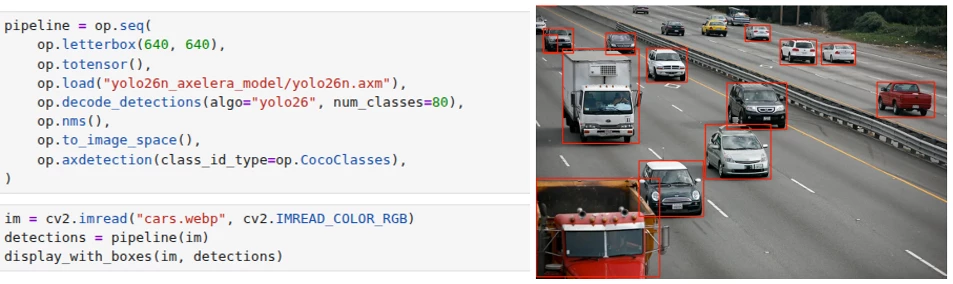
Example: Load a model, run inference, display detections, all in the same Python programming unit
The API ships with 30+ operators spanning pre-processing, inference, post-processing, filtering, and tracking. Results come back as typed objects (DetectedObject, PoseObject, SegmentedObject, TrackedObject) with .draw() visualization built in. A pipeline optimizer automatically fuses operator chains into SIMD-accelerated kernels where possible. The entire tensor layer is DLPack-compatible, so data moves zero-copy between the pipeline and PyTorch, JAX or NumPy without leaving device memory. Additionally, you can also package and export pipelines into the new packaging .axe portable format for easy redistribution.
Expanded Model Zoo
Version 1.6 adds significant coverage across vision tasks:
- Object Detection: GELAN-S/M/C (the Ultralytics YOLOv9 backbone), Ultralytics YOLO26-X, and the Ultralytics YOLO-NAS S/M/L family from Deci AI with quantization-aware blocks
- Instance Segmentation: Ultralytics YOLO26-N through Ultralytics YOLO26-X Seg variants
- Pose Estimation: Ultralytics YOLO26-N through Ultralytics YOLO26-X Pose
- Oriented Bounding Boxes: Ultralytics YOLO26 OBB variants for rotated object detection
- Re-Identification: SBS-S50 backbone enabling full Deep-OC-SORT re-identification tracking on Axelera hardware
All new models ship with ready-to-use YAML pipeline files and pre-compiled downloads via axdownloadmodel.
TrackTrack and Advanced Multi-Object Tracking
The tracking stack gets a major upgrade with TrackTrack, a state-of-the-art multi-object tracking algorithm from CVPR 2025 that uses iterative matching with track-aware NMS. It's implemented in C++ with Python bindings and available through both the YAML and Pipeline Builder APIs.
Alongside TrackTrack, this release adds Camera Motion Compensation (CMC), which is critical for moving-camera deployments, for (Deep-)OC-SORT and an experimental Memory Bank feature that lets the tracker restore a person's ID after they leave and re-enter the scene.
Multi-Stream Tiling and OpenCL Acceleration
For multi-camera deployments, tiling pipelines now support multiple camera sources simultaneously, with per-stream tiling configurations via the tile[...]:source syntax. New tools (tile_config.py, camera_scan.py) automate pipeline generation and camera setup.
On the performance side, face alignment, color conversion, polar transforms, and region of interest cropping are now OpenCL-accelerated, and DMA buffer passthrough on ARM eliminates memory copies, particularly valuable on the Metis Compute Board where camera and display share DMA buffers.
Broader Platform and Virtualization Support
Beyond the new operating system support already mentioned, version 1.6 adds:
- Yocto integration via
meta-axeleraand build sources for the Metis Compute Board - KVM PCIe passthrough (currently in Beta) to pass Metis devices into VMs with the full runtime stack running inside the guest
- New validated hardware platforms including the Dell Pro Slim Plus XE5 and AsRock NUC Box-125
- PyTorch 2.7–2.10 support in the compilation environment
Developer Tooling Improvements
As we continue to improve the developer experience and tooling, the following updates were made:
- TOML compiler configs replace JSON as the default as they are more readable and more editable (JSON still works if you prefer it.)
axcompileis the new CLI entry point, replacing python-m axelera.compiler.compileaxdownloadmediafetches test videos and images from cloud storage for benchmarking and experimentationaxdevice driver --installautomates PCIe driver setup on Debian systemsaxmonitornow shows DDR bandwidth plots and extended power measurements, making it easier to identify whether workloads are memory-bound or compute-bound- The PCIe Linux driver source is publicly available under a GPLv2 license, so you can build the kernel module yourself
Try it out
Voyager SDK v1.6 is available now:
# Installation (on Linux)
git clone https://github.com/axelera-ai-hub/voyager-sdk.git
cd voyager-sdk
./install.sh --all --YES --media

# Run a Computer Vision application using Yolov8
axdownloadmodel yolov8l-coco
./inference.py yolov8l-coco media/traffic1_1080p.mp4

# Run an LLM chatbot using Llama3.2
axllm llama-3-2-1b-1024-4core-static --prompt "Tell me a joke"
For the full release notes, documentation, and technical support, visit the Axelera AI Customer Portal.
We'd love to hear what you build with it! Comment below or share more about your project in Axelera’s Community.