

Life after application.py - Iterative testing and learning

  • July 30, 2025
  • 35 replies
  • 431 views

Show first post

35 replies

alexander.iakovlev
Cadet

Hello ​@saadtiwana 

Thank you for providing detailed information and for going so far to debug this issue. I have confirmed the results you got using our own RK3588, and the issue is due to processor architecture. As of degirum 0.18.0, we only support x86 processors for our Axelera integration. ARM support for Axelera is a priority, and we hope to release it in the very near future. Looking forward to seeing your results soon!


saadtiwana
Ensign
Forum|alt.badge.img+1
  • Ensign
  • August 12, 2025

Hi ​@alexander.iakovlev , ​@shashi.chilappagari ,

Thanks for getting back to me on this. May I know how soon will that be? Since I need to create a POC before end of the month using Axelera Metis, i guess that degirum will not be an option for me anymore. Please make this very clear on the documentation until you get the ARM support out, since this could have saved me valuable time.


shashi.chilappagari
Ensign

Hi ​@saadtiwana 

Firstly, we sincerely apologize for the inconvenience and for the time you had to spend testing a version that wasn’t built for your use case. We are already updating our documentation to make these limitations clearer going forward.

Secondly, we are actively working on a new release with ARM support. While we can’t share the exact release schedule today, we will provide you with a confirmed timeline by tomorrow afternoon (about 16 hours from now).

Thank you for your understanding and patience.


alexander.iakovlev
Cadet

Hello ​@saadtiwana, ​@shashi.chilappagari,

As I mentioned yesterday, releasing ARM support is the utmost priority for us and we have been working as fast as possible to make that a reality. We have just finished all internal tests to confirm its stability, and we are proud to release version 0.18.2 today with ARM support for Axelera devices. Thank you so much for patience in this journey, and sorry for our documentation not including the lack of ARM support prior to this release.


shashi.chilappagari
Ensign

Hi ​@saadtiwana 

We would like to request you to give PySDK one more try as we hope that 0.18.2 release should work with your system. From our side, we made sure that we tested it on the RK3588 system (similar to the one you have) and that all models in our model zoo run correctly. We hope it works this time.

@alexander.iakovlev Thanks for the quick release of 0.18.2.


saadtiwana
Ensign
Forum|alt.badge.img+1
  • Ensign
  • August 13, 2025

Hi ​@alexander.iakovlev , ​@shashi.chilappagari ,

Wow that is waaaaay quicker than I thought. Really thanks a lot for releasing this in such a short time frame. I updated my degirum package this morning (pip install --upgrade degirum degirum-tools) after seeing your messages and I’m happy to report… we have lift-off!


I then went ahead with downloading and running some models locally and so far it seems to be working fine. I do more testing in the coming days and report any issues I encounter. So far it’s looking great!

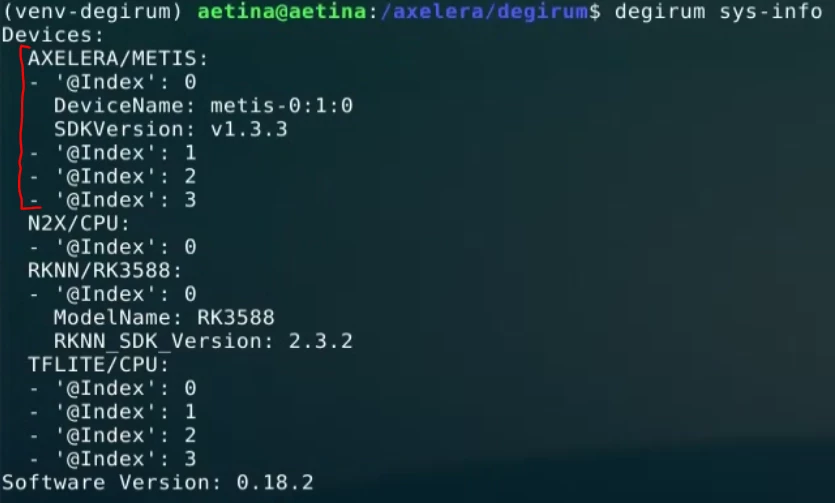
Btw, one thing I wanted to ask: When we have a device with multiple cores (I believe those are seen as @Index<n> in the sys-info ouput), can we control which core(s) or how many cores to run a model on? I’m thinking of cases when one needs to run multiple models in parallel using degirum.

Once again, thanks a lot for expediting the release for the arm architecture..I am humbled!


shashi.chilappagari
Ensign

Hi ​@saadtiwana 

Very happy to hear that PySDK is working on your side. Our heartfelt thanks to you for sticking with us and trying it for 3 times. Your feedback alone improved our PySDK a lot (support for new runtime version, support for ARM). 

Yes, we can control the number of cores to run a model on but not the exact cores on which they run. But once assigned, the cores for the model remain fixed. After loading a model, you can see `model.devices_available` to see all devices on which you can run (it should show [0,1,2,3]). You can then assign a list of devices to `model.devices_selected` to specify the cores on which you want to run the model. We will publish a detailed user guide on this but feel free to reach out in the meantime if you encounter any issues with this or any other feature.

Thanks you once again. 


vlad.klimov
Cadet
  • Cadet
  • August 13, 2025

Hi ​@saadtiwana ,

Please be advised that we support effective scheduling of multiple models running in parallel.
Of course you can manually assign which sub-device to use for which model like ​@shashi.chilappagari suggested. But if you just leave things as is, our scheduler will automatically distribute the job between sub-devices, minimizing model switching. The model object has model.eager_batch_size attribute which controls model switching behavior: a model A will be switched to another model B only after model_A.eager_batch_size number of frames will be completed for model A. The advantage of automatic scheduling is that in case of models with different FPS or with different load, there will be no idle sub-devices. Imagine you have two models running in parallel, one is big and slow, and another one is small and fast. You decided to give two cores each. Then two cores for fast model will be idling. Then you saw that and decided to distribute 3/1. Then it might be that now some of 3 cores are idling. Then you decided to run three models in parallel - here things become even more complicated. Bottom line: yes, you can do manual assignment (like you can manually program CPU affinity for regular C++ programs) but it is not sustainable/maintainable.

BTW, degiruim-tools package provides multiple ways to effectively run multiple models in parallel. Check out Compound Models | DeGirum Docs for simple single-threaded model combining, and Streams | DeGirum Docs for more advance multi-threaded model pipelining (similar to GStreamer but much simpler and in Python)


saadtiwana
Ensign
Forum|alt.badge.img+1
  • Ensign
  • August 22, 2025

Hi ​@shashi.chilappagari , ​@vlad.klimov ,s

Thanks for all the help. I have made good progress with this. In the past week I managed to test the whole chain, starting from collecting my own images and building a dataset, training yolo11m models on it, converting it to metis-compatible model via the degirum online compiler and running it on the device with tiling (since I need to detect very small objects). Overall, I have had good success with the process.

One issue I see is that, sometimes if i compare the yolo(11m) model via the ultralytics hub website versus the online inference tool (which is great to have btw!) on your degirum hub, some objects are getting detected (>0.8 score) by the former but not the latter. Input is exactly same images. I am thinking maybe it’s due to some issue during the quantization process. I notice that there is an option to add a dataset for use during the quantization process which should help with this but I can’t find any information regarding how the dataset should be formatted etc. Even there was a FAQ post regarding the online compiler few days ago but details about what exactly it expects (images? annotations? in what formats, how many, etc) were not there. Can you help to clarify this so I can try it out. I feel that if the original model is detecting an object with 80% confidence, then the converted model should also detect it even if with slightly less confidence.

Second issue I am having is with detecting relatively bigger objects in the images when using tiling in pysdk, however we can come to it once the above is resolved.

Thanks for all your help!

Best Regards,
Saad


shashi.chilappagari
Ensign

Hi ​@saadtiwana 

Great to hear about your progress. Regarding calibration data: just attach image files (64-100) to the compiler form. Please click on the Advanced Options button and you should be able to attach image files.