Project MotionFlow - A smart motion sensor

  • December 14, 2025
  • 3 replies
  • 45 views

Hi all!
 
I’m happy to be aboard the Smarter Spaces Challenge!
 
MotionFlow turns one (or several) RTSP cameras into a privacy-preserving activity sensor for the smart home. Instead of “motion / no motion” that PIR sensors provide, it tries to answer the more useful questions: Is someone sitting at the desk? Walking through a room? Lying down on the couch?
 
What it does
Each camera stream runs through a lightweight pipeline on the edge:
  • Pose estimation on each frame
  • Zones to map “where” persons are (e.g., couch area, desk, hallway).
  • Activity classification from the keypoint geometry (angles, ratios, posture).
  • MQTT events as the output so Home Assistant / Node-RED can react (lights, scenes, etc.).
Why I’m building it
I’ve been running home automation for a while, and presence sensing is still very limited: PIR loses you when you sit still, and many camera solutions assume cloud processing.
MotionFlow aims for a practical middle ground: richer context than standard sensors, while keeping video local and publishing only simple state.
 
System sketch
RTSP Cameras → Pose → Activity + Zone Logic → MQTT → Home Automation
 
Currently, I'm setting up a local test system on my laptop, while waiting for the hardware to arrive.
A basic setup is already running, consisting of a RTSP server (mediamtx docker) providing dummy videos and a first application draft that consumes the RTSP streams and pre-processes them for inference.
 
Next up is getting a pose model running (probably YOLOv11) - I'll keep you updated!
 
Looking forward to seeing what everyone is building!
 
- Jonathan

3 replies

Spanner
Axelera Team
Forum|alt.badge.img+2
  • Axelera Team
  • December 15, 2025

Yo ​@FreezerJohn , welcome to the big show!

You already said the magic words for me: “Home Assistant” and “Node-RED”! I’ve talked a bit about home automation here on the community, but I think this is the first time Node RED has come up, which is an awesome tool.

If you can feed triggers and events into Node RED - whether it’s from a simple magnetic door contact or AI inference events from a camera feed - you can do anything with them. It’s the beginnings of seriously powerful and endlessly customisable control and automation, so I can’t wait to see this in action!


  • Author
  • Ensign
  • December 22, 2025

@Spanner Absolutely, Node-RED is great! I’m running my home automation purely on it since forever - I actually haven’t made the switch to Home Assistant yet..
 

Project Update

My Laptop Dev-Setup (openVINO) runs yolov11l-pose with a OneEuroFilter for skeleton smoothing. Results looks quite stable and promising.

In the meanwhile the Axelera hardware package arrived - thanks a lot! 
Just in time for Christmas holidays, so I started setting it up right away:

sudo apt-get install -y \
libgstreamer1.0-dev \
libgstreamer-plugins-base1.0-dev \
libgstreamer-plugins-bad1.0-dev \
gstreamer1.0-plugins-base \
gstreamer1.0-plugins-good \
gstreamer1.0-plugins-bad \
gstreamer1.0-plugins-ugly \
gstreamer1.0-libav \
gstreamer1.0-tools
sudo apt-get update
sudo apt install -y librga-dev


The inference.py demo is running smoothly! 😀

Next up will be migrating my existing code to the Orange Pi setup. Basically replacing the openVINO inference with the voyager-SDK calls.
 

So long - happy holidays everyone!

-Jonathan


  • Author
  • Ensign
  • January 6, 2026

Project Update #2


I continued development on my laptop using OpenVINO for inference, preparing the ground for the switch to the Axelera hardware later.
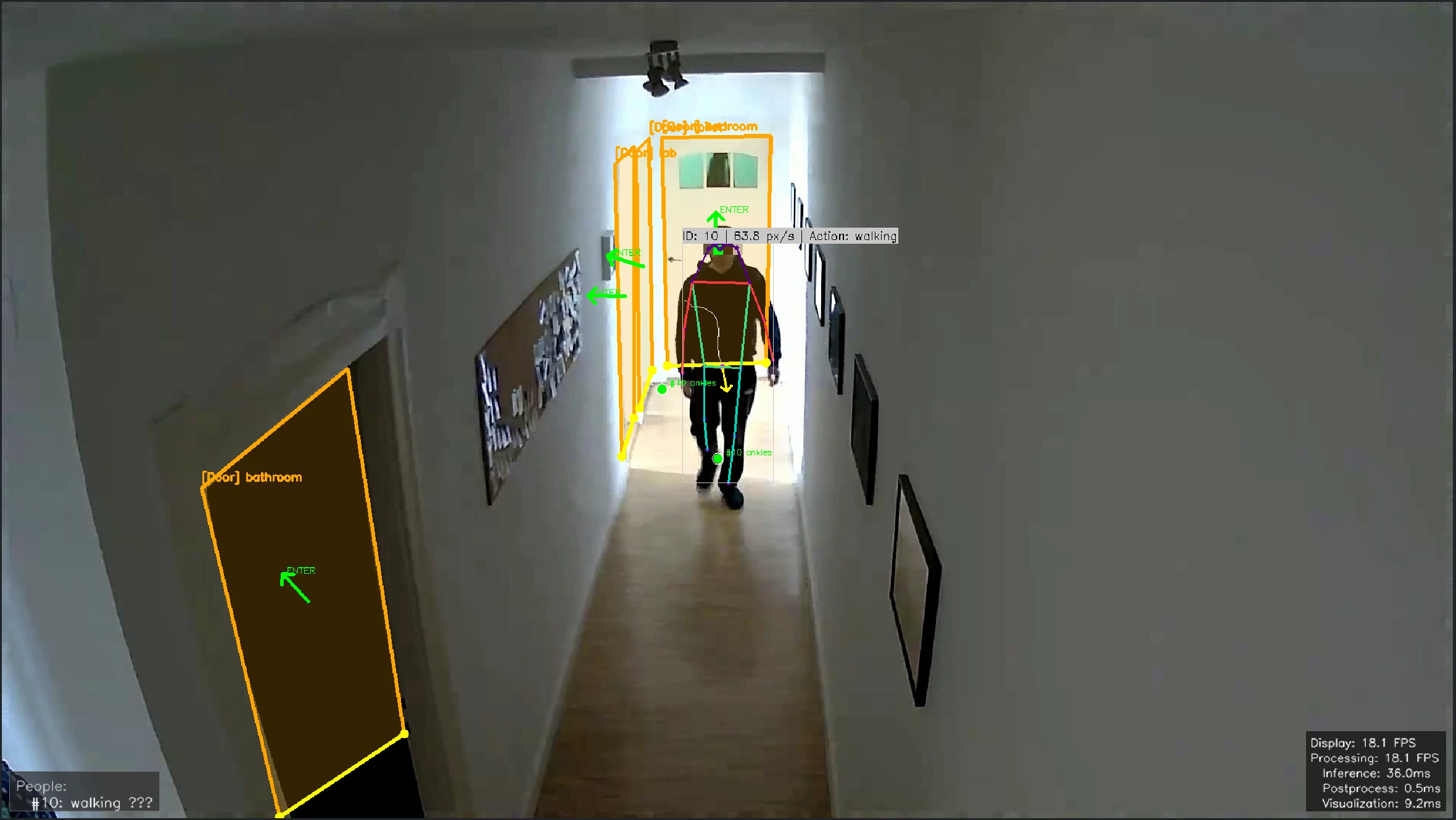
So far I got a proof-of-concept running, focusing on zone occupation and door interactions at first. Digging into the action recognition part will be the next step.
 
PoC - Debug Visualization


Architecture overview

The system is configured via a central `settings.yaml` file, which defines the cameras, zones, and system parameters.
 
The main application is composed of several key modules working as a pipeline:
  • Capture: continuously read the RTSP stream to ensure low-latency access to the latest frame.
  • Perception:  run the pose model (YOLOv11), while ByteTrack assigns persistent IDs to people.
  • Logic: `Zone` and `Door` modules check the tracked skeletons against user-defined areas in the config.
  • Events: A event manager monitors state changes and dispatches them to MQTT.
  • Visualization: Using openCV for debug visualization.
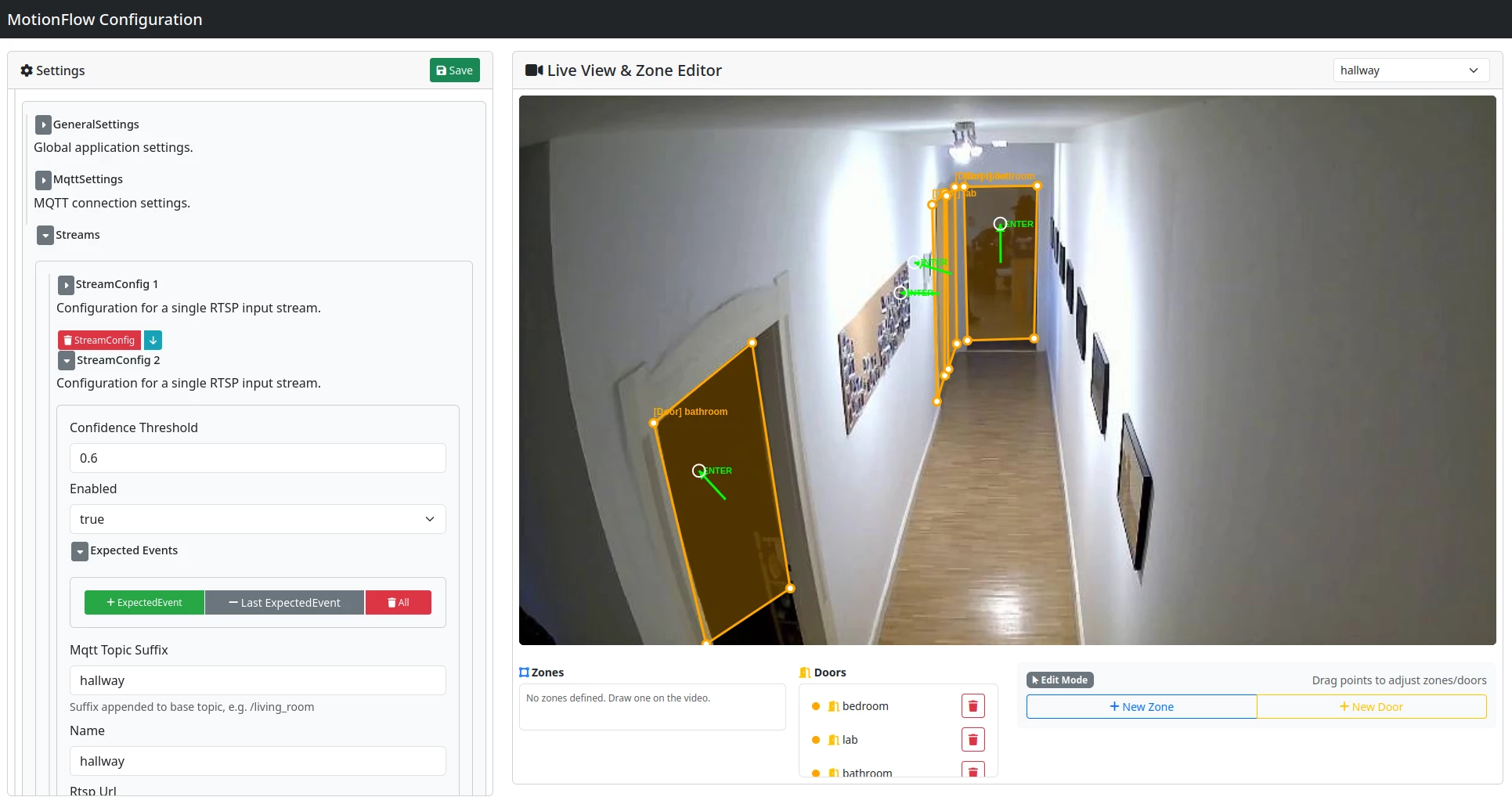
Complementing this is a separate Web UI, which serves purely as a visual editor for the configuration file.
 

Zones & Doors

Zones are just polygons you define e.g, "Couch", "Desk", etc. The system checks if tracked persons are inside.
Doors are a special case of a zone, they also have a "enter direction" vector. Here, I'm using a tripwire approach: when someone's ankles cross the door line, it fires an enter/exit event.
 
The tricky part is side angles where people vanish behind walls mid-crossing. To handle this, the system tracks velocity: if a person disappears near a door while moving toward it, it counts as a crossing. Seems quite robust!
 

Config Web UI

I thought I'd need a web interface for configuration eventually, but figured it makes life much easier to have it up-front. Especially with editing polygon coordinates in the yaml file..
 
Since I'm not a web dev, I let Copilot do most of the scaffold and came up with a Flask UI quickly.


Web UI


Next Up

Now that the core logic is working, I'm shifting focus to:
  • Action Recognition: I'm currently looking into how to interpret the pose data (standing/sitting/lying). I'm already curious what approaches other challengers are using here!
  • Cleanup: Refactor and cleanup code, push to to Github
  • Voyager SDK Integration: Move the inference to the Axelera Metis. I need to figure out how to replicate the yolo-pose + tracking pipeline on the accelerator. Looking into the YAML pipeline configuration.
Best
- Jonathan