Unable to Enter Loader Mode on Aetina Host - Board Going into Maskrom Mode

  • July 17, 2025
  • 19 replies
  • 150 views

saadtiwana
Ensign
Forum|alt.badge.img+1

@shabaz Thanks for the nice write-up. The Aetina board does have a very small amount of storage and I have needed to delete things a few times to recover some space. I tried installing the sd card but ran into some issue (the voyager models stopped working for some reason - I think i made some mistake in linking - i need to revisit it).  Anyway, my question: When we install an external SSD or SD card and mount it, is there a way to let the linux system use it like an extension of the existing storage? Reason i ask is, I notice different types of files will go into different places in the filesystem. For example, voyager SDK will use a specific location to download the models etc, and apt will use different locations(s) to download data, and so on. So I could potentially end up in a situation where I have a whole 128GB available on the SD card but the linux system is not really using it. Thoughts? 

19 replies

shabaz
Ensign
Forum|alt.badge.img+1
  • Ensign
  • July 17, 2025

Hi ​@saadtiwana ,

From what I can tell, the easiest way will be to rely on symlinks to make use of the microSD card.

For instance, let's say your microSD card is mounted at /mnt/microsd 

There is a folder on the built-in storage (eMMC) called /axelera and the voyager SDK can be installed to that. So, one option is to delete the /axelera folder (sudo rm -rf /axelera) and then recreate it as a symbolic link pointing to either the microsd mount or a folder in there.

Example:

sudo ln -s /mnt/microsd /axelera

The above command will result in what looks like a folder called /axelera, in the same location as the deleted one, but it's actually a link to /mnt/microsd so no storage space on eMMC will be used if you store stuff in /axelera after that.

I did the above, except since I also had a ssd, I simply changed the command to:

sudo ln -s /mnt/m2ssd /axelera


And then change the permissions, e.g.:

sudo chmod aetina:aetina /mnt/microsd

Then, I prematurely followed the Voyager SDK installation instructions, and did it in the /axelera folder rather than the user home directory (/home/aetina) but during install, realized that the SDK will install some things in a folder in the user home directory anyway, in the folder /home/aetina/.cache/axelera/data so I stopped.

The solution was to delete the voyager SDK folder and then delete the axelera folder from the .cache folder, and then create another symlink:

cd /axelera

rm -rf voyager-sdk

cd /home/aetina/.cache

rm -rf axelera

sudo mkdir /mnt/microsd/aetina_cache_axelera

sudo chmod aetina:aetina /mnt/microsd/aetina_cache_axelera

ln -s /mnt/microsd/aetina_cache_axelera /home/aetina/.cache/axelera

cd /mnt/microsd/aetina_cache_axelera

mkdir data

So, to summarize, anything that now was ever written to /axelera, or to /home/aetina/.cache/axelera or any subfolders, would end up actually written to the microSD card.

(Note: there may be small things that I’ve accidentally missed, since I am just typing from notes, and have not retested each command, but it’s fairly complete, just take your time and do it line-by-line and keep an eye out and ensure each command successfully executes, i.e. don’t copy-paste all commands in one go).

After that, if you install the voyager SDK in the /axelera folder, it will mostly consume space on the microSD card. It actually will still use up some eMMC storage, because that is still used for all the dependencies (which will end up in places such as /usr/lib and so on) and some axelera runtime and compiler apps which will get placed in /opt/axelera and those are still on eMMC but at least it won't use a lot of eMMC. (Note: it's not as easy to use a symlink for /opt, I tried that and it didn't work because the install script ends up overwriting the symlink partway, so for now it's easier to just leave /opt on the eMMC, but it is feasible to do something about it later if really necessary).

Anyway, it's absolutely imperative not to allow eMMC to fill to 100%, because that will be very difficult to recover from, so if it looks like you're approaching 100% (keep typing df -k to see the current level) then it's worth aborting installing things to decide what can be deleted or moved.

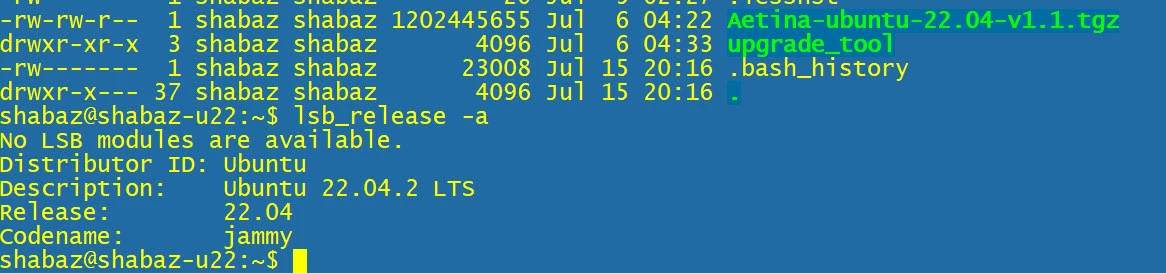
Worst case, if you get to 100% and find the system non-recoverable, then you'd have to reimage the system, which requires a USB Type A to USB Type C cable, and an x64 Linux machine. I only know this because I needed to do it : ) It was my fault, I mistyped an entry in /etc/fstab, and nothing would boot. It's not something to be super-worried about, but if it occurs, then you'll need to reimage, and then spend an hour or two setting up things again. Definitely worth getting a USB A-to-C cable so that you’re ready to do this if needed. You will need a Linux server as mentioned earlier to do the re-imaging procedure, screenshot below shows what I needed to download on the Linux server to do the upgrade so you have a rough idea, but the detail is at that hyperlink.


I hope this helps, if you get stuck anywhere just send a message, I’ll try to check frequently. 


saadtiwana
Ensign
Forum|alt.badge.img+1
  • Author
  • Ensign
  • July 18, 2025

 Hi ​@shabaz. Thank you very much for the detailed reply. I will go through the whole procedure on my board and let you know if any issues. Yesterday after trying (unsuccessfuly) to find the culprits behind the space consumption, I decided it’s best to reimage the board and start from scratch. I did come across the links you shared earlier, but now that you mention you’ve gone through them gave me more confidence to go that route :D

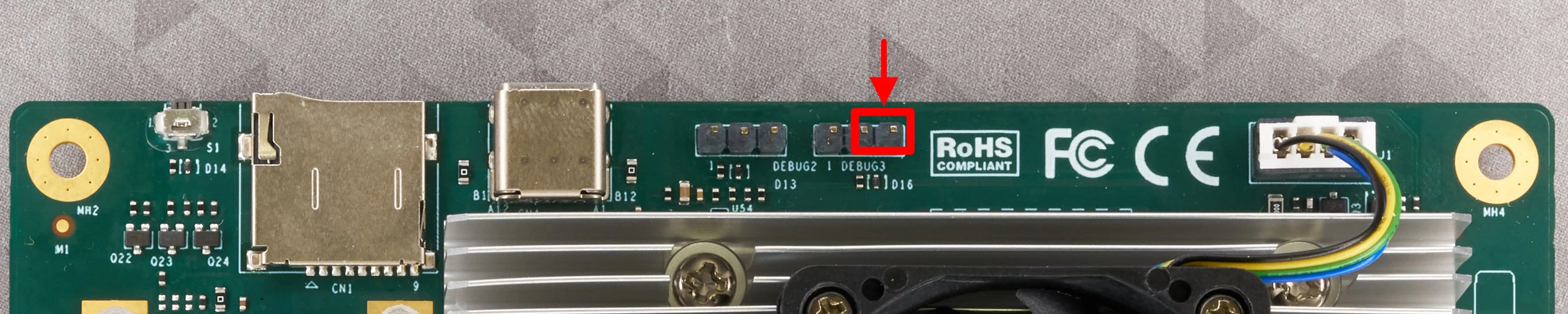
Anyway, I didn’t have a x86 machine running linux natively, so i tried one of my Ubuntu 18 VMs. I followed the procedure in the ppt in the link to put the board into “Loader” mode (shorting pins 2&3 of DEBUG3 header before power up and removing few seconds after power up). However, every time the board went into Maskrom mode instead. I tried this at least 20-30 times but I could never get the board into the Loader mode. Any ideas as to what might be happening?


saadtiwana
Ensign
Forum|alt.badge.img+1
  • Author
  • Ensign
  • July 18, 2025

Somehow the image didn’t get attached to my message earlier. Here is what I see. Note the “Mode=Maskrom” part.


shabaz
Ensign
Forum|alt.badge.img+1
  • Ensign
  • July 18, 2025

Hi ​@saadtiwana ,

Interesting, I didn’t see the message you do : ( I saw output as described at that web page. I didn’t save the output (I normally try to but I forgot) however from the command history I can see I typed these commands, i.e. not much different to what is mentioned in that guide,

sudo tar -xvzf Aetina-ubuntu-22.04-v1.1.tgz

cd rockdev/

sudo chmod +x upgrade_tool 

./upgrade_tool LD

./flash.sh 

sudo apt-get install adb

sudo adb shell


Just to be 100% sure, the jumper was definitely in the correct place, right?

Initially I just shorted it with a clipped resistor lead, and held it there for about 3-4 seconds after the fans started up (Later I found a normal jumper in case I need to do it again in future).

It could be worth trying a different USB-A to USB-C cable (some are deceptive and only provide charging power and no data), and also trying a different USB-A port on your machine, just in case that makes a difference (perhaps one USB port on the PC is USB 2.0 and the other is 3.0). Also, check the VM settings in case you can change the USB configuration (and try different options there, I don’t have VirtualBox or other hypervisor currently installed to see what the options are, but I think there will be some). According to Google, ADB should work with VMs, provided USB Passthrough is configured for the VM. Hard to know what else to suggest : (


shabaz
Ensign
Forum|alt.badge.img+1
  • Ensign
  • July 18, 2025

Hi ​@saadtiwana 

Hm just thinking about it some more, the fact you saw the maskrom message must mean the USB connection is fine and the Virtual Machine USB config must be fine too (I think).

So it must be the jumper connection. I could be totally wrong though...


saadtiwana
Ensign
Forum|alt.badge.img+1
  • Author
  • Ensign
  • July 18, 2025

Hi ​@shabaz Thanks for your detailed replies. So I did try different USB ports, also making sure the USB ports were all USB3 type. Also, I tried two high quality cables, both of which I also confirmed with a USB3 camera I have (if the cable doesn’t have USB3 conductors, then the camera will fall back to USB2 mode and the frame rate is severely limited, so it’s easy to spot!). The VM passthrough was also enabled. I don’t think it should be an issue with my Ubuntu version (18) since the mode switch is happening on the board, and only getting reported to the board over the USB. The commands I used are exactly as you mention.

For shorting, I used a 15cm Dupont female-to-female wire. I assumed it was OK since when i didn’t use it, the board boots up normally after applying power. Anyway, I will try directly shorting with a short piece of wire as you mentioned. Maybe the wire had more resistance than expected by the board (if that matters?)

One thing I do miss about this board is the lack of schematics. For example, the board brochure/flyer on the Aetina website mentions a port for Audio output and another for for RS232 but there are no details I could find anywhere regarding the pinout. A schematic would have helped. Also, there are two MIPI connector pads on one side (unpopulated) which seems like RPi style Mipi connectors but hard to say without a detailed manual or schematic. Similarly, having a schematic would have helped see what the pins are connected to and then trying to lookup the RK3588 datasheet to troubleshoot why the board is not behaving as expected. <End of EE rant!>

Let me try a different jumper connection later and report back. Thank you.


shabaz
Ensign
Forum|alt.badge.img+1
  • Ensign
  • July 18, 2025

Hi ​@saadtiwana ,

Regarding the RS-232, there's a RS-232 transcever chip on the board so I probed the nearest connector to it so have figured that out, I'll post the connections detail later today or tomorrow (will be out most of the day).


Spanner
Axelera Team
Forum|alt.badge.img+3
  • Axelera Team
  • July 18, 2025

@shabaz, thanks so much for all the help you’re providing here! You’re the MAN!

I don’t have anything overly helpful to add here that Shabaz hasn’t already suggested, other than reiterating about a more solid jumper and being fairly critical with the timing - as I understand it, leaving the pins shorted either more or less than the 3-4 seconds can cause it to fall back into Maskrom mode.

I’ve not heard about anyone trying this using a VM either. It might well work, but I could also see that introducing inconsistencies in timing, inumeration, etc.

One thought in this respect ​@saadtiwana - could you create a live USB with Ubuntu on it, and run that on another computer? An old laptop or something. You wouldn’t have to install it - just run the live USB, so you’ve got a working, local Linux machine to help with reflashing?


saadtiwana
Ensign
Forum|alt.badge.img+1
  • Author
  • Ensign
  • July 18, 2025

Hi ​@Spanner Thanks for the suggestions. Later when I am back home, I will try some more with variations on the timing as you mentioned. I did have the live USB option in mind. If nothing else works, I will definitely give it a go as well. Last night when I was trying all of this, it was post-1AM, so I will try again with a more fresh mind today..let’s see :)


Spanner
Axelera Team
Forum|alt.badge.img+3
  • Axelera Team
  • July 18, 2025

I know exactly what you mean! You get to a point where you can’t tell if it’s the computer or your brain that keeps crashing 😆

Keep us posted, and we’ll see what we can do to help!

(Also, if it’s cool with you, I’ll break this conversation out into its own thread, to make it easier for you (and everyone) to keep track of 👍)


saadtiwana
Ensign
Forum|alt.badge.img+1
  • Author
  • Ensign
  • July 18, 2025

Ok, so here is what all I have tried this evening:

  • I tried some more using the VM from yesterday, trying different variations in the process. Nothing worked.
  • I made a Ubuntu 22 bootable usb using balena etcher, used that to boot one laptop into ubuntu, and then tried the procedure again. Still only getting the board to go into Maskrom
  • I tried all variations I could think of (time to keep the jumper on, using power button, reset button etc etc). No luck.
  • Changed to yet another good USB-C data cable
  • Remove everything from the board (HDMI cable, keyboard/mouse dongle, even the wifi M2 card I was using). Tried many variations again. Nothing worked.

Leaving this comment from within the live Ubuntu session. Running out of ideas on what else I can try at this point.

@Spanner Any other person we can ask for help?


saadtiwana
Ensign
Forum|alt.badge.img+1
  • Author
  • Ensign
  • July 18, 2025

Btw, forgot to mention, I did use other materials for jumper also (metal tweezer, piece of wire, small metal allen key as conductor) and nothing produced the desired result. When I use any of these at boot, the board goes into Maskrom, and when I don’t, it goes into normal linux booting.


shabaz
Ensign
Forum|alt.badge.img+1
  • Ensign
  • July 19, 2025

Hi ​@saadtiwana ,

Just a long shot, but could you take a close-up detailed photo of your board where you are making the jumper connection, showing how you're doing g the connection?

I just wanted to visually compare with my board. In case your board revision looks slightly different, or if one of the nearby resistors looks unsoldered or something. 

I think as supplied your board must have been imaged using this method, so its unlikely there is a fault on the board in this area, but I can't see what else to suggest.

And just to be 1000% sure, its a USB A to C cable, right, and not C-to-C? Apologies for these obvious things, Im sure you are doing it right however. I'm just stuck for ideas : (


Spanner
Axelera Team
Forum|alt.badge.img+3
  • Axelera Team
  • July 21, 2025

Hi ​@saadtiwana!

I was just talking to ​@Steven Hunsche about this, who’s a total Aetina ninja, and he said that when this happens he just goes ahead and sets it off flashing, even if it reports that it’s in maskrom mode. And it usually works!


saadtiwana
Ensign
Forum|alt.badge.img+1
  • Author
  • Ensign
  • July 23, 2025

Hi ​@Spanner and ​@shabaz !

I have been silent here but was busy behind the scenes. Here’s what happened:

I first did a visual inspection of the board components below my PCB rework microscope, motivated by Shabaz’s suggestion. Thankfully all seemed to be in order. Anyway, after trying some more combinations of timing, sequence etc, which did not work, I noticed that the ppt file linked in the system reimaging page did not mention about making sure the board is in Loader mode. So I decided to just try that, and it worked! So it’s clear that the board DOES NOT need to be in Loader mode necessarily, and Maskrom mode works as well (I would recommend updating the imaging guide with this very important info - it cost me a few evenings!). Later I saw the post above from Spanner which confirms the same.

Anyway, after that I proceeded with doing all the other things (installing wifi, sd card, linking the folders, and was finally reinstalling docker and voyager SDK before I slept last night). I am also writing down all the commands I used in one github page, which is a combination of information on the help pages and also instructions shared by Shabaz. Once I finish it tonight, I will share a link here on the community. 

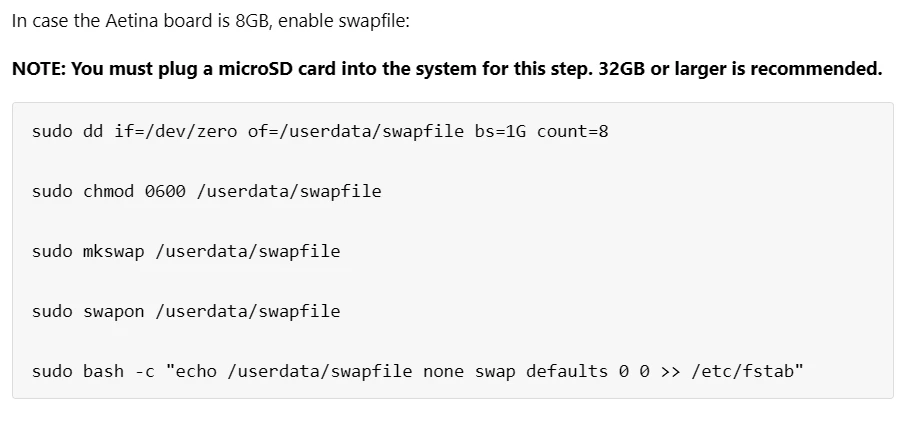
Btw, one thing I am confused about is the instructions on configuring the swap file in the imaging guide page:

Do I understand correctly that the purpose of configuring swap file is to utilize the SD card for swap storage (the line in bold says there must be a SD card)? However, the instructions create the swap file in the /userdata/ folder, which is not linked to the SDcard, so this would end up using the EMMC.

Am I missing something?


shabaz
Ensign
Forum|alt.badge.img+1
  • Ensign
  • July 23, 2025

Hi ​@saadtiwana 

Glad it’s working! I think your board has 16Gbytes of RAM, not 8Gbytes, so you can skip the ‘enable swapfile’ section. (I typed free in Linux, and it displays the value (in kbytes).  That portion of notes is to ensure there’s plenty of RAM, by allowing Linux to dump to portions of RAM to Flash (whether that’s on eMMC or micro SD is another point, you may want it to be the fastest of the two, but if it were eMMC then then you’d have to be extremely sure it wouldn’t get totally full (hard to guarantee that while experimenting and installing packages on the fly), and that you have enough space for everything else, i.e. you’d need a SD card anyway).

I don’t know the answer, but at any rate, since there was 16Gbytes of RAM, I skipped the swapfile portion, it’s been OK so far. Since I have an M.2 SSD installed, I could in theory enable swap there since that should be quite fast, but I’ll burn that bridge when I get to it, if it ever feels that 16Gbytes RAM is insufficient.

Anyway, awesome news that things are finally sorted with your board.


Spanner
Axelera Team
Forum|alt.badge.img+3
  • Axelera Team
  • July 23, 2025

I’m also not sure about the swap file - interesting question! Will look into that 👍

Anyway, that’s awesome that you’re back up and running ​@saadtiwana! And thanks for all your continued help ​@shabaz! You remain the man! 😄

Be great to see your documentation too ​@saadtiwana - please do share that when it’s ready 👍 (Might be good to make a brand new post for that, when you do - I feel like there might be a lot of replies to that one!)


saadtiwana
Ensign
Forum|alt.badge.img+1
  • Author
  • Ensign
  • July 24, 2025

@shabaz You were absolutely correct. I went home and looked at the RAM on my board, and it has 16G RAM. I guess my confusion came from the fact that the board page on the Axelera website says 8GB (and 512MB in another place :) ). Anyway, glad it’s all sorted now and I am back to working with the board. Hope to post some progress on the project this weekend.


@Spanner I will post it as a new thread once it’s completed..just a few things left (couldn’t finish last night).


Spanner
Axelera Team
Forum|alt.badge.img+3
  • Axelera Team
  • July 24, 2025

Excellent, great work guys! We may need to update the product listing there 😅 I’ll take a look, thanks 👍