
A.B.C. ( A.I. Book Cataloguer )

  • December 3, 2025
  • 8 replies
  • 107 views

Denovo
Cadet

Hello everyone! This is our first thread in the community, and we’re excited to share what we’re building with the challenge kit!


Project title

A.B.C. ( A.I. Book Cataloguer )


What you’ll be building

We’re developing a next-generation tabletop station that automatically scans a book’s cover, uses an on-device AI model to extract the title, author, and publisher, and instantly displays the results on screen. The operator simply places the book on the surface beneath a camera connected to the Orange Pi running Metis and reviews the output-fast, intuitive, and hands-free.

The system combines an object-recognition model, used to distinguish the operator’s hands from the book itself, with an OCR model that extracts the text of interest directly from the cover, enabling accurate, real-time identification of title, author, and publisher.

If the information is correct, the book is cleared; if not, the operator simply crosses their index fingers to form an X under the camera. This gesture is detected by the same object-recognition model, triggering a bold red "REJECTED" message on the display and signaling that the system should re-scan the book or flag it for review.


Why this project matters to you

We care deeply about this project because it’s an idea we developed last year-one that led us to found Denovo as an innovative startup in the field of AI-driven mechatronics, and a project we’ve been eager to pursue ever since. Thanks to Axelera’s challenge and the Metis kit, we can’t wait to finally bring it to life!


What problem it aims to solve

Our project is designed to solve a well-known challenge in the world of collection digitisation: manual cataloguing is slow, cumbersome, and error-prone. Today, operators must read each book’s data, enter it by hand, and correct any mistakes-a process that significantly slows down workflows and undermines metadata quality.

Our solution eliminates all of this. It automates information extraction and introduces a simple, natural correction gesture, allowing the entire process to become faster, far more accurate, and remarkably intuitive. In short, we tackle the core challenge of digitisation: transforming a repetitive, high-risk task into a smart, efficient, and reliable experience.


Where you think you’ll get started

We actually started thinking about this project last year, at least conceptually. But now we’re ready to move faster, and we can’t wait to receive the kit so we can finally start putting the pieces of the puzzle together, beginning with the hardware setup and the logistical structure needed to run our tests and turn the concept into a working prototype.


Anything else you'd like to add!

We’re a small international team - two Italian engineers and a Polish project manager - and we’re really excited to take part in a European competition in the field of artificial intelligence. We’ve already developed several products on commercial hardware, but this is truly our first real edge-AI project coming to life, and that makes it even more inspiring for us.


 

8 replies

Spanner
Axelera Team
Forum|alt.badge.img+2
  • Axelera Team
  • December 3, 2025

I could see this being huge in all kinds of ways. Libraries are an obvious application, but second hand bookshops are what really grabs my attention!

I LOVE second hand bookshops, but in the UK at least, they find it hard to survive in a post print-and-paper world. They need remises for a brick and mortar shop, but to survive, they probably also need to go online. But imagine trying to keep up to that? Thousands upon thousands of books to catalogue, constantly changing, new stock coming in… that’s a bit, onerous task! If they just pass each one under your scanner, suddenly the hard work for running an online business too is taken care of.

Comic book shops too, if it’d be able to get the info from a comic book cover? A LOT of noise on there! Be interesting to see you experiment with that, though.

And that's a great idea using a gesture to flag incorrect responses - genius! Can’t wait to see this take shape 👍


Denovo
Cadet
  • Author
  • Cadet
  • December 3, 2025

Thanks a lot Spanner! We are really really excited and yes… we have thought of comics too 😉


Denovo
Cadet
  • Author
  • Cadet
  • December 20, 2025


Santa Claus came early, since a beautiful package just arrived from the Netherlands 😄


We’ll be spending the whole weekend digging through everything in this box and will get back to you soon with our next steps!


Spanner
Axelera Team
Forum|alt.badge.img+2
  • Axelera Team
  • December 21, 2025

Awesome! Now you can carry on working over Christmas! 🤣


Denovo
Cadet
  • Author
  • Cadet
  • December 22, 2025

yeah.. we were thinking the same 😂


Denovo
Cadet
  • Author
  • Cadet
  • January 12, 2026

Last week we unpacked all the items from the box to select the setup we needed:

  • Orange Pi + Metis + SD card

  • TP-Link router

  • TP-Link Wi-Fi USB adapter

  • 1x Sonoff Cam S2

  • Monitor

  • Cables and power adapters

The hardware assembly was straightforward and easy to configure, except for a missing screw to fix the Metis to the Orange Pi. We double-checked the kit but couldn’t find any suitable screw, so we had to look for an alternative.

On the software side, the Sonoff Cam requires an app called eWeLink (available for Android and iOS) for initial setup. The app requires both the device and the camera to be connected to the same Wi-Fi network, and both must be able to reach the eWeLink servers via the internet. Unfortunately, the camera loses the RTSP setting after a power-off. This means that every time the device is powered on, we need to reconnect the camera to the internet and use the eWeLink app again to re-enable RTSP before it can be used by our software. We will investigate further to see whether it is possible to bypass the app in some way.

This week we moved on to the more interesting part: installing the Voyager SDK by following the official guide. For some reason, the process did not complete successfully on the first attempt because the Orange Pi froze once. However, after a reboot and fixing the packages, the setup completed without any errors.

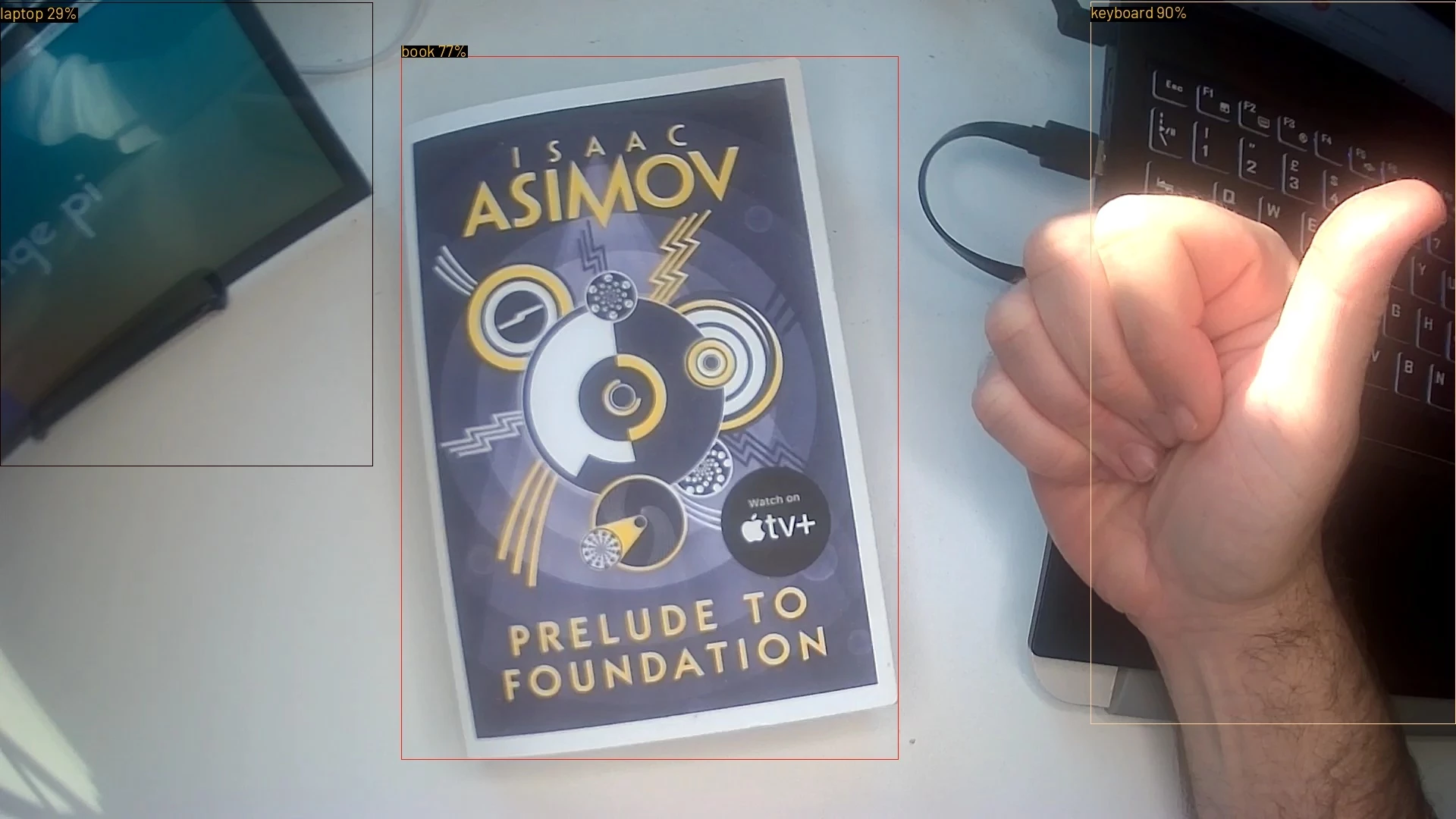
Finally, we launched inference.py and successfully tested our first book!

We have done a lot of photos, but I think this is more interesting 😀


Spanner
Axelera Team
Forum|alt.badge.img+2
  • Axelera Team
  • January 12, 2026

Yeah, great choice for a first book to scan! Perfect for this project, and it’s always good to stick to the three laws 😄

That’s annoying about the RTSP feed from the Sonoff camera. Usually Sonoff are pretty good in terms of RTSP (and even Onvif). I’ll do some research on that front, too.

But awesome work dude! You’ll be finished by the end of the week! 🤣


Denovo
Cadet
  • Author
  • Cadet
  • January 12, 2026

it could be awesome 😁

We have great news! It appears that authentication is required now on the app side only to enable the RTSP setting. After multiple power off/power on cycles, the camera retains the configuration - so we’re ready to operate offline!

Next step: choose the right model for object recognition and the best OCR. Frame rate is currently low, but probably we can improve it.