
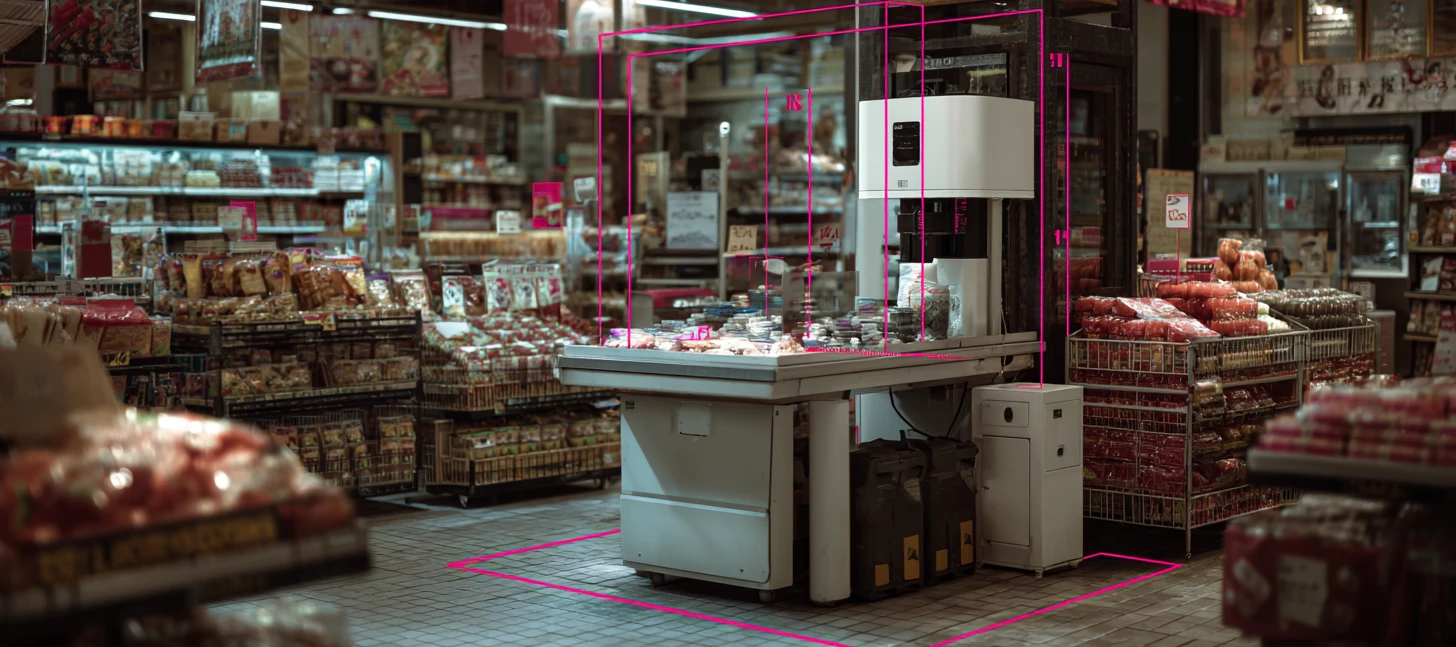




Your practical guide for checkout-automation teams, POS vendors, and the engineers who actually have to build and test this smart store stuff.
If you're evaluating low-power inference hardware for point-of-sale or smart-store deployments, here's how to think about the decision, what these systems actually need, a few reference builds you could put together today with off-the-shelf Axelera AI components, and the numbers that make the business case stack up.
It’s a subject we’re very interested in and spend a lot of time thinking about, so we wanted to look at real models, real pipelines, and real prices that could determine how you could transform any store.
Defining "Smart Retail" and "POS Integration"
A quick scoping exercise, because these phrases get thrown around a lot.
Smart retail, and by extension smart stores, is the idea of turning cameras and sensors you mostly already own into a live stream of useful data, rather than passive CCTV nobody looks at until something's already gone wrong. The camera stops being a recorder and becomes a sensor.
POS integration specifically means vision running alongside the till, not replacing it. In practice that splits into three patterns:
-
Assisted self-checkout. A camera over the bagging area confirms that items the shopper scanned matches what they actually put through. This is where the money is, so we’ll come back to it.
-
Vision-assisted manned tills. Same idea, lighter touch. Flag mis-scans and ticket-switching for a human to glance at.
-
Autonomous, grab-and-go stores. The full cashierless experience, where cameras track who took what and the basket builds itself.
The thread running through all three is that most of it runs on the standard camera infrastructure you already have. Anything that demands you rip out and replace every camera in the estate is dead before it starts. Axelera's own retail use-case page makes the point that using existing camera infrastructure is what makes these systems feasible to scale, and it's worth keeping front of mind through everything we’re investigating.
What’s Really Required to Adopt Vision AI?
Before you pick a card, it’s good practice to fully understand the constraints of that choice. Five of them matter.
-
Latency. A checkout transaction lasts a second or two. If your item-verification check has to take a round-trip to a cloud GPU and back, you've already lost. The inference has to happen locally, at the lane, in the moment.
-
Bandwidth and connectivity. Stores, especially in rural locations, have unreliable uplinks. This isn't a new problem; the POS system itself moved to the edge years ago precisely because intermittent connections threaten the one system a retailer can’t afford to drop. The one that collects revenue. As Insight's analysis of retail edge platforms puts it, retailers place compute directly in stores to keep critical systems running through network interruptions. Vision AI inherits that same requirement. Streaming raw video to the cloud for inference is a non-starter on both cost and reliability.
-
Privacy and data residency. Keeping shopper video on-premise rather than piping faces to a cloud service is both a compliance win and a matter of trust. Local processing means the sensitive data never leaves the building.
-
Power and thermal budget. A card going into a checkout kiosk or a ceiling enclosure has almost no room to breathe. There's no space for a 60W GPU and a screaming fan. You need server-class throughput inside a thermal envelope measured in single-digit watts.
-
Cost at scale. This is the one that can kill a pilot project. A solution that works beautifully on one lane has to be multiplied across hundreds of lanes and across hundreds of stores. Axelera is pretty blunt about this on our own retail page, because it really is that important: the high cost of GPU-based hardware means "innovations getting stuck in the pilot phase, preventing widespread adoption." The per-lane hardware cost is your adoption decision.
Put those five together and the brief begins to write itself:
-
Power efficient
-
Low latency
-
Runs locally
-
Works with existing cameras
-
Cheap enough to deploy at scale
That's a rock solid foundation to identify the hardware to deploy in a smart store.
Mapping Requirements to Hardware
Axelera's Metis line comes in several form factors, and the right one depends entirely on what your deployment looks like. It’s a range designed match the shape of your problem to the shape of the card.
| Your Deployment | Best-Fit Hardware | Requirements |
|---|---|---|
| Single lane or small kiosk, tight thermal budget | Metis M.2 (or M.2 Max) | Tiny 2280 module, fits where a GPU never could, very low power |
| One PC, multiple cameras (a store zone, back-of-house) | Metis PCIe (1-chip), 214 TOPS | One card, many streams, drops into a standard host system |
| Whole-store backbone or autonomous store | Metis PCIe (4-chip), 856 TOPS | Dozens of streams plus parallel and cascaded models on one card |
| Evaluating before you commit | Metis Compute Board or a partner eval system | Everything pre-integrated, up and running in minutes |
-
The Metis M.2 runs server-class inference at roughly 3.5 to 9W typical power, in a standard M.2 2280 module. That is the form factor and power envelope that fits inside a checkout terminal.
-
The newer M.2 Max brings PCIe-class performance to the same M.2 footprint, with up to 16GB of memory, secure boot, extended temperature options for industrial deployment, and an onboard power probe that auto-tunes performance to a thermal budget. It's the newest member of the family, and the one to watch if your kiosk also wants to run a small language or vision-language model locally.
-
The 1-chip PCIe card delivers up to 214 TOPS and is the workhorse for multi-camera store zones. We’ve demonstrated 24 concurrent 1080p streams running object detection on a single Metis AIPU.
-
The 4-chip PCIe card scales to 856 TOPS for the heaviest whole-store workloads.
-
The Metis Compute Board pairs a Metis AIPU with a Rockchip RK3588 ARM CPU in a single-board computer, so you can prototype a complete edge device without building a host around it.
Three Reference Builds You Could Ship Today
These are illustrative reference architectures, not deployments in actua stores. But every component, model, and pipeline below is real and available right now in the Voyager SDK. You could order the parts this afternoon and start building.
A note on the software path before we dive in. There are two ways onto Metis, and they suit different people:
-
The fast on-ramp. If you live in the Ultralytics world, you can export a YOLO model to Metis in one line:
model.export(format="axelera"). As of early 2026 this path is an experimental integration and currently covers object detection, with pose and segmentation on the roadmap. Brilliant for a first run; check current task support before you build production on it. -
The production path. The Voyager SDK itself, where you build pipelines in YAML (or its Python API), chain models into cascades, add trackers, and run many camera streams in parallel. This is what the builds below use, because real retail systems need more than single-model detection.
Build 1: Self-Checkout Loss Prevention (the Flagship
The problem. Cart-based loss at self-checkout, the non-scans and the label switches, is the single biggest leak in modern retail. (The numbers are genuinely eye-watering! See the next section.)
The hardware. A Metis M.2 card inside or beside the self-checkout terminal. Tiny, low power, sits right at the lane.
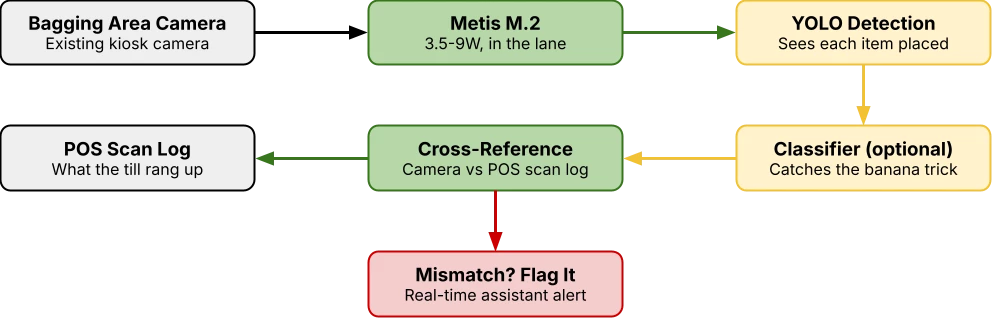
The models. A YOLO object detector as the primary model. Voyager ships YOLO26 and YOLOv8 in the model zoo, with verified throughput: yolov8s-coco runs at 531 FPS on M.2, yolo26s-coco at 394 FPS. Optionally cascade the detector into a fine-grained classifier (the zoo has EfficientNet, MobileNetV4 and others) to tell a £4 avocado from a 40p onion, the classic "banana trick" where a shopper rings up a cheap item for an expensive one.
The pipeline. Camera over the bagging area → YOLO detects each item as it's placed down → cross-reference the detected item against the live POS scan log → if the camera sees something the till did not ring up, or sees a mismatch, flag it in real time for the attendant. Object-detection networks ensuring scanned items match their labels, using video recognition instead of weight-and-scale tricks.
Even the lightest detector here runs at hundreds of frames per second on a single low-power M.2 card, so a single accelerator comfortably covers the verification workload of a lane, with headroom to spare.
Build 2: Shelf and Store Analytics
The problem. Empty shelves and phantom inventory. A shopper who finds a gap where their product should be is a shopper who buys it from someone else.
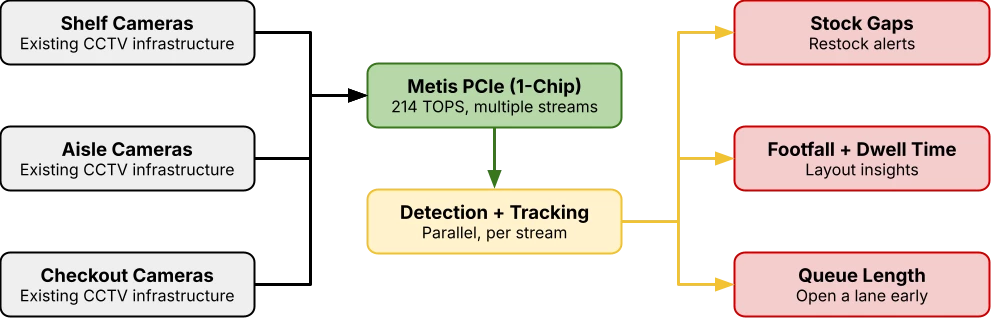
The hardware. A single 1-chip Metis PCIe card (214 TOPS) in a back-of-house PC, fed by the ceiling cameras you already have.
The models. YOLO detection paired with object tracking for shelf-gap and out-of-stock detection, plus people-counting and queue-length monitoring. Voyager's model zoo includes reference cascade and tracker pipelines out of the box, and the OSNet re-identification model (1,745 FPS on PCIe) if you want to follow shoppers consistently across multiple camera views.
The pipeline. Multiple camera feeds run in parallel on one card. Each stream goes through detection and tracking; shelf cameras report gaps, entrance and aisle cameras report footfall and dwell time, checkout cameras report queue length so you can open a lane before the line builds. This is precisely the parallel, multi-model workload Axelera designed the four self-sufficient AIPU cores around: object detection, classification and pose estimation handled in parallel.
Build 3: Curbside / Click-and-Collect ANPR
The problem. Order pickup is a coordination mess. Staff don't know a customer has arrived until they're standing there, or worse, the wrong order goes to the wrong car.
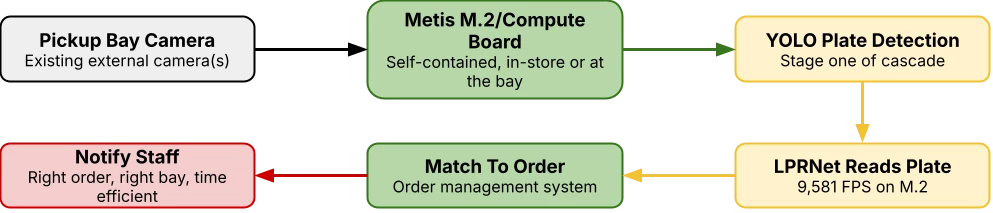
The hardware. A Metis M.2 card or a Metis Compute Board at the pickup bay. Self-contained, weatherproof enclosure, no host PC required if you use the Compute Board.
The models. A licence-plate cascade: YOLO detects the plate, then LPRNet reads it. LPRNet is in the Voyager model zoo and runs at (an absurd) 9,581 FPS on M.2, so plate recognition is effectively free, leaving the card idle to do other work.
The pipeline. Camera at the bay → plate detected → plate read → matched against the order management system → Staff notified that order #1234's car has arrived, in the right bay. Match orders to arriving vehicles and cut errors.
The Benefits, in Numbers That Actually Hold Up
Retail shrink was projected to hit roughly $ 132 billion in losses globally in 2024, up from $112 billion in 2022, according to a Capital One report cited by BizTech -
Self-checkout is where it concentrates. Edge computer-vision firm Everseen analysed over a billion transactions and found cart-based loss had doubled in a year to make up 30% of all self-checkout incidents. The average number of items left unscanned per incident rose from 1.6 to 3.8, and the average value of those items from $11.10 to $22.90. For a typical grocery store with 12 self-checkout lanes, that adds up to $102,000 of loss per year. Hold that number against the price of the hardware in Build 1 and this conversation takes a sharp turn.
Computer vision measurably reduces it. IDC forecasts that by 2028, half of large retailers will expand computer vision for store monitoring, cutting shrinkage by around 40%. A 2024 deployment in European electronics stores reduced concealment-based theft by 41% through real-time alerts.
Out-of-stocks cost sales too. It is not only theft. Our own study shows that 23% of customers are lost to competitors when retailers run outdated inventory systems, which is the entire business case for Build 2.
And the efficiency angle pays the power bill. This is where "low power" stops being a buzzword and becomes a line item. The Metis AIPU reaches 214 TOPS at only 4-8W (lower potentially, application contingent), while a comparable GPU can draw up to 60W for similar throughput. Across hundreds of always-on lanes, that difference compounds into a serious operating cost, and it's the difference between a card that fits in a kiosk and one that doesn't.
Stack it up, and the total cost of ownership is the whole point:
Existing cameras + single-digit-watt power + a per-lane card that costs a fraction of a GPU = a project that finally escapes the pilot phase and rolls out to 500 stores.
Getting Hands-On
If you build retail vision systems, the fastest way to know whether Metis fits is to put a model on one and measure it.
Try it. The Metis Compute Board is a complete edge device out of the box, and the 1-chip PCIe card drops into a standard host PC. Pre-integrated evaluation systems get you from unboxing to running a network in under ten minutes.
Build it. The Voyager SDK is on GitHub, with a model zoo of 50+ models and YAML-based pipeline configuration. If you're coming from Ultralytics, the YOLO-to-Axelera export path gets your first model running fast.
Talk it through. Designing a retail pipeline and want to sanity-check the approach, the model choice, or the hardware sizing? That's exactly the kind of thing the Axelera community is for. Post your use case, and people who've built this stuff will weigh in.


